Morningmate is a project management platform that brings tasks, communication, and file storage into one workspace.
Founded in 2015 by a California-based team, the company built Morningmate to solve a common pain point: juggling multiple tools just to keep a team aligned.
What really sets it apart is the fixed pricing on the Advanced plan. It costs $199 per month for up to 300 users, which is a fraction of what you’d pay with per-user pricing from competitors like Asana or Monday.com.
The platform works well for small to mid-sized teams that want an all-in-one solution without enterprise-level complexity. You get built-in chat, Gantt charts, file storage, and even AI-powered task suggestions.
Prices start at $8.99 per user per month with annual billing, and you can test everything with a 14-day free trial. There’s also a free plan available that supports up to five projects and 500MB of storage per user.
| Subtasks | |
|---|---|
| Task dependencies | |
| Task prioritization | |
| Task deadlines |
Morningmate covers the essentials without trying to be everything to everyone.
The platform combines task management, team communication, and file storage in one place, providing less tab-switching, fewer tools to pay for, and a cleaner workflow overall.
We found it works best for teams that value getting things done over endless customization options.
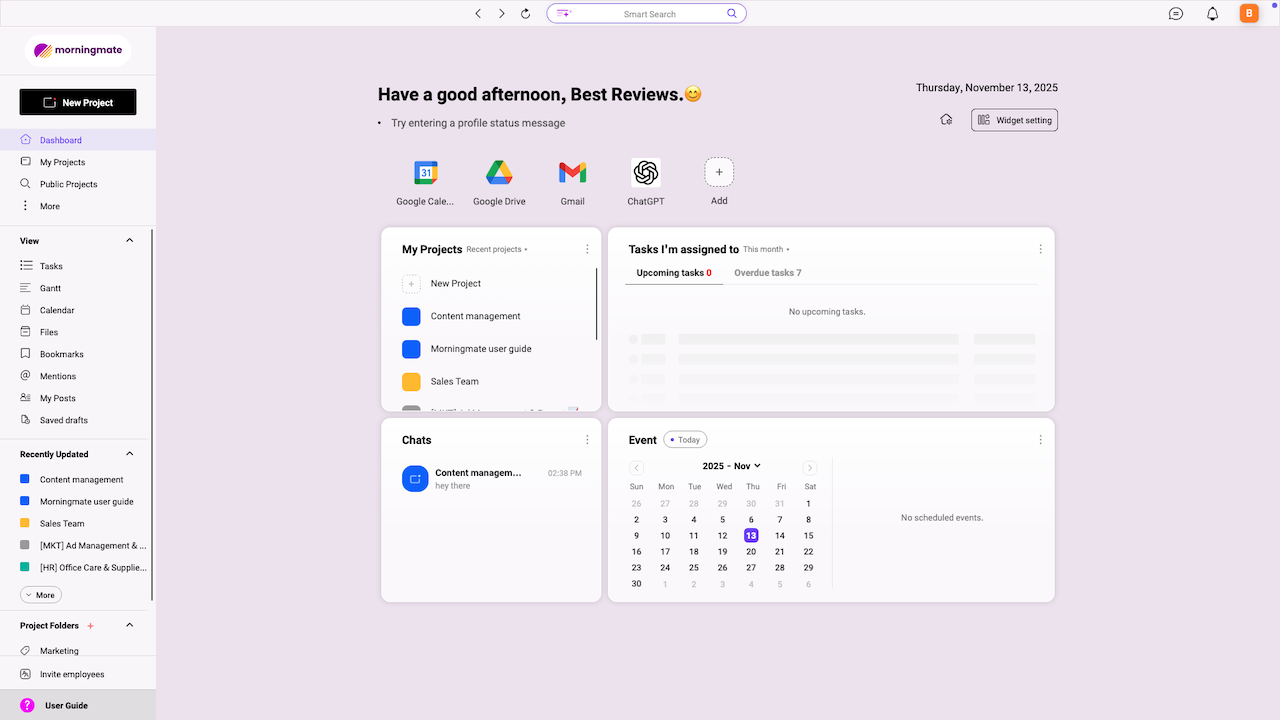
Creating tasks and subtasks is intuitive, though we hit a few walls.
You can start building projects and tasks right from the main dashboard. Click ‘Add Task’, fill in the details, assign it to someone, and you’re done. For quick entries, it’s a piece of cake.
Subtasks exist, but feel a bit limited. For example, creating subtasks for a main task in a bigger project takes more clicks than it should. Worse, the first step you create ends up at the bottom of your subtask list, making you have the extra work of sorting everything out in the end.


You can’t select multiple tasks to edit them in bulk either. Neither can you import tasks from other places, which is a big downside if Morningmate isn’t your first online project manager.
On the upside, you can set priorities and deadlines easily. Both are built-in fields, so there’s no messing around with custom setups just to mark something urgent.
Managers can allocate tasks to team members with a click. The AI suggests the right person based on workload and past assignments, which actually speeds things up.
Morningmate offers four main project views: Gantt, list, calendar, and feed.


The Gantt chart gives you a timeline view that’s helpful for tracking project milestones. It’s not as feature-packed as dedicated Gantt tools, but it covers what most teams need without the overwhelm.
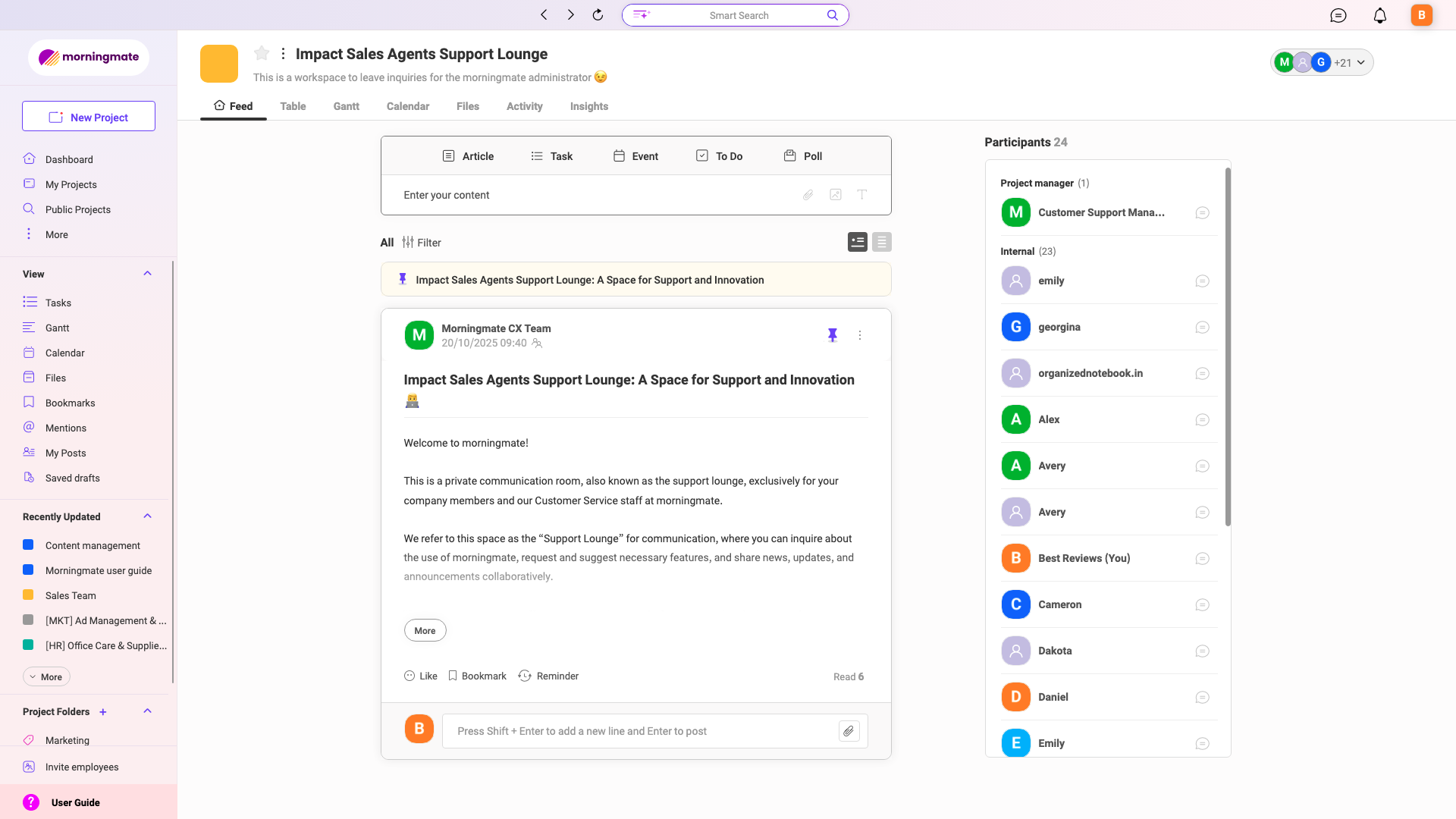
The feed view shows an activity timeline for each project – who did what, when, and where things stand. This is genuinely useful if you’re managing a team and don’t want to constantly ask for status updates.
You can also add all your files for a project in one place. Morningmate integrates with Google Workspace, Dropbox, and OneDrive, making it easy to pull in documents from cloud storage.
Collaboration happens through comments, @mentions, real-time updates, and built-in chat.
The chat lives right inside the platform, so you’re not bouncing over to Slack or Teams. You can create group chats or send direct messages, and there’s even a ‘secret message’ option for private notes.


We found the activity tab particularly helpful. It tracks every update across projects, so if someone comments on a task or uploads a file, you’ll see it immediately.
Morningmate also lets you create posts for internal communication – think of it like a lightweight intranet where you can share company updates or announcements without leaving the platform.
Storage limits depend on your plan.
The free plan includes 500MB per user – tight but workable for small teams. Starter bumps it up to 1TB total, and Advanced offers a generous 5TB.

File upload size is 10MB on the free plan and 1GB on paid plans. We didn’t hit any snags uploading documents. Everything went through smoothly, whether pulling from Google Drive or uploading directly.
Morningmate handles basic automation like notifications, recurring tasks, and status updates.
You can set tasks to repeat daily, weekly, or monthly, and the system will notify assignees automatically. It’s not as powerful as Zapier-style workflows, but it saves time on repetitive admin work.
The automation here is functional. Nothing groundbreaking, but it works.
Reporting in Morningmate is clean and organized, though nothing fancy.
You get task reports showing completed vs pending items, plus a calendar view that tracks deadlines. The dashboard also displays workload distribution across team members.

It’s enough to keep managers informed without drowning them in charts.
That being said, advanced analytics like burndown charts or custom reports aren’t available, so teams with complex reporting needs might feel limited.
Morningmate includes AI-powered assistance (called Morningmate AI), which is available on the Starter plan and above.
The AI provides templates for project briefs, posts, and other content you can customize. It doesn’t write everything for you, but it gives you a solid starting point.
It also suggests subtasks when breaking down larger projects, which helps speed up the planning process.
Plus, it recommends team members when assigning work based on availability and past performance.
The AI integration is practical – it handles the groundwork, allowing you to focus on the actual work.


Setup took us 10-15 minutes, and the interface is intuitive.
You won’t need a tutorial to figure out where things are. The left sidebar organizes projects, tasks, chat, and files logically. The main workspace adapts based on your view (list, calendar, Gantt).
We appreciated that Morningmate doesn’t overwhelm you with options. The design is minimal, and the learning curve is gentle even if you’re not particularly tech-savvy.
Here’s where Morningmate surprised us: the mobile app is actually more user-friendly than the desktop version. Navigation feels easier and less clunky, and the interface is clean and intuitive.
The feed view has a bit too much white space, but that’s a minor complaint. For quick check-ins, completing tasks, and daily updates, the mobile app is genuinely better. We found ourselves reaching for our phones more often than expected.
Still, the desktop version makes sense for managerial work, such as reviewing reports, setting up complex projects, or handling tasks that require a larger screen.


Morningmate is ISO/IEC 27001 and CSA STAR certified, and also complies with the GDPR.
The platform runs on AWS cloud infrastructure with network security that blocks unidentified external access, data encryption for all traffic and data, and a support team available 24/7 for security incidents.
All personal data is encrypted and stored securely as well.
For teams with stricter requirements, Morningmate offers on-premises deployment so you maintain full control over your data and infrastructure. The company also supports hosting on Google Cloud and Microsoft Azure.
The Advanced and Enterprise plans add the following:
Morningmate integrates with Google Workspace, Zoom, Microsoft Teams, Dropbox, and OneDrive.
The Google Workspace integration is particularly smooth – you can pull files directly from Drive without leaving the platform.
For video meetings, you can launch Zoom or Teams calls straight from a project or task, which keeps everything connected.

Enterprises offers custom integrations, chatbot support, and AD/SSO for larger organizations with specific needs.
| Lowest price | $8.99/user/mo |
| Free trial | 14 days |
| Money-back guarantee | |
| Free version |
Morningmate offers four plans: Free, Starter, Advanced, and Enterprise.
Free sticks around forever and includes up to five projects, built-in chat, and 500MB storage per user. It’s solid for solo users or very small teams just getting started.
Starter costs $8.99 per user per month with annual billing (or $11.99 monthly). You get unlimited projects, 1TB storage, Morningmate AI, and 24/7 support. There’s no minimum number of users, so even a team of three can subscribe without paying for empty seats. However, you can only have a maximum of 30 people in this plan.
Advanced is where Morningmate really shines.
At $199 per month (billed annually), you get everything in Starter plus 5TB file storage, advanced security, and support for up to 300 users.
Here’s the cherry on top: no per-user charge. Whether you have 10 people or 300, the price stays the same. That’s a massive advantage over competitors, where costs scale with every new hire.
Enterprise pricing is quote-based and includes flexible deployment options, custom features, and data migration support.
All paid plans come with a 14-day free trial – no credit card required. After that, you’ll automatically downgrade to the free plan if you don’t subscribe. You’re never charged unless you actively choose a paid plan, which is a breath of fresh air.
The refund policy is case-by-case but fair. If you forget to cancel but haven’t been active, they’ll review your usage and offer a partial refund based on actual activity.
| 24/7 | |
| Live chat | |
| Phone |
Support quality depends on your plan.
Free users can only reach out via email. Meanwhile, paid subscribers get 24/7 support through live chat and email. Phone support is available for Advanced and Enterprise customers.
We tested the email support and got a response within a few hours. Not instant, but acceptable.
Morningmate provides a knowledge base with guides and FAQs, though it’s not as thorough as what you’d find with bigger platforms like Zendesk or Asana. The articles cover the basics, but for advanced troubleshooting, you’re better off contacting support directly.
There’s also a blog, and you can find plenty of useful videos on the company’s YouTube channel.
The company is active on social media (LinkedIn, Facebook, and Instagram), but those channels are more for announcements than actual support.
Morningmate is a solid all-in-one project management platform that gets the fundamentals right.
It’s best for small to mid-sized teams (up to 300 users) that want task management, communication, and file storage in one place without paying escalating per-user fees.

The Advanced plan offers exceptional value if you’re managing a growing team. At $199 per month for up to 300 users, it undercuts most competitors by a significant margin.
That being said, Morningmate isn’t without limitations.
The lack of native time tracking, project budgeting, and invoicing means you’ll need workarounds or integrations if those features are non-negotiable. Plus, task management could be more flexible.
We’d recommend Morningmate for:
Skip it if you need:
We recommend testing Morningmate first by taking advantage of the 14-day free trial available. If you’re running a small company, the free plan might be a suitable fit for your needs.
The Best Reviews team researches and tests all products first-hand. We've been reviewing products and services since 2012 and are proud to only publish human-created content.






Share your thoughts, ask questions, and connect with other users. Your feedback helps our community make better decisions.
©2012-2025 Best Reviews, a clovio brand –
All rights
reserved