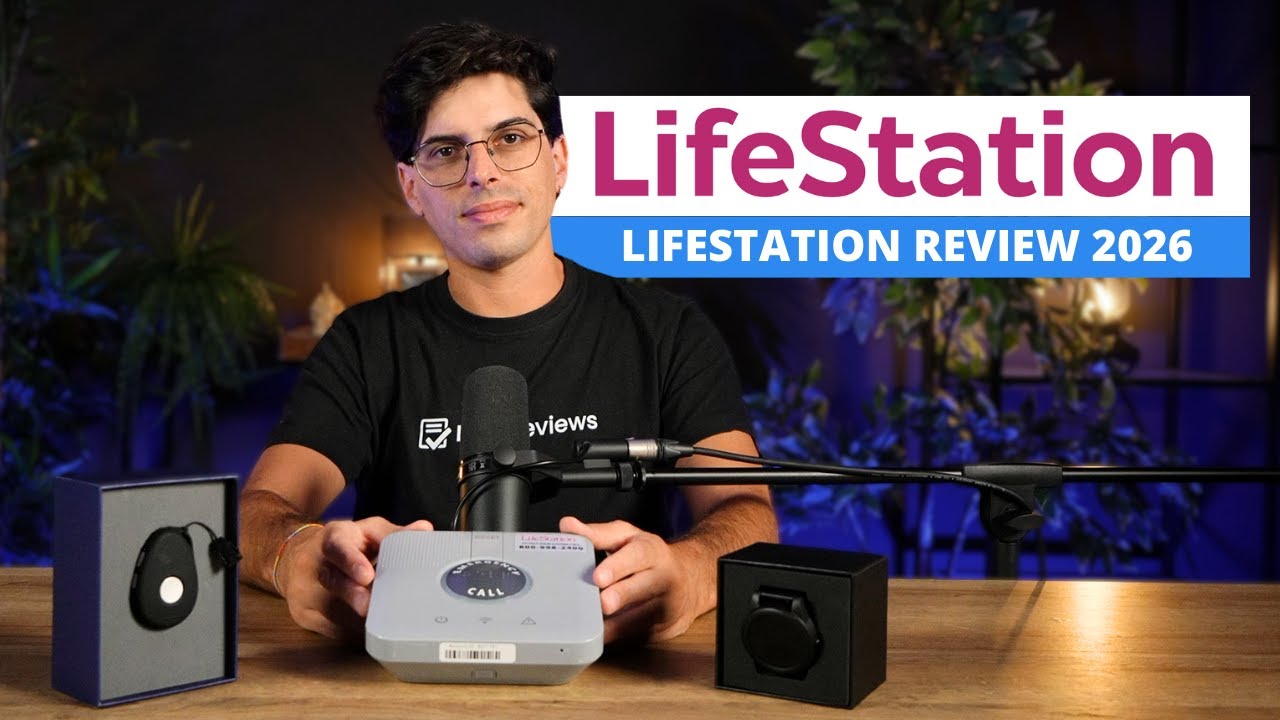
LifeStation was established by renowned veterans in the medical alert industry to provide safety and independence to the elderly and support to their caregivers. With three devices designed for both in-home and outside use, including a modern smartwatch, LifeStation protects seniors of all activity levels.
Subscriptions start at $35.95 per month, and you can learn more about its pricing structure by calling +1 (855)-622-7321. If you’d like to try it out first, LifeStation offers a 30-day money-back guarantee, which gives you enough time to get a feel for how its medical alert systems can help you.
| Central units | |
|---|---|
| Wireless/cellular systems | |
| Wrist pendants | |
| Necklaces |
LifeStation offers UL-certified medical alert devices that fit different lifestyles. Whether you enjoy spending time at home or outdoors, it provides a solution that will cater to your current routine.
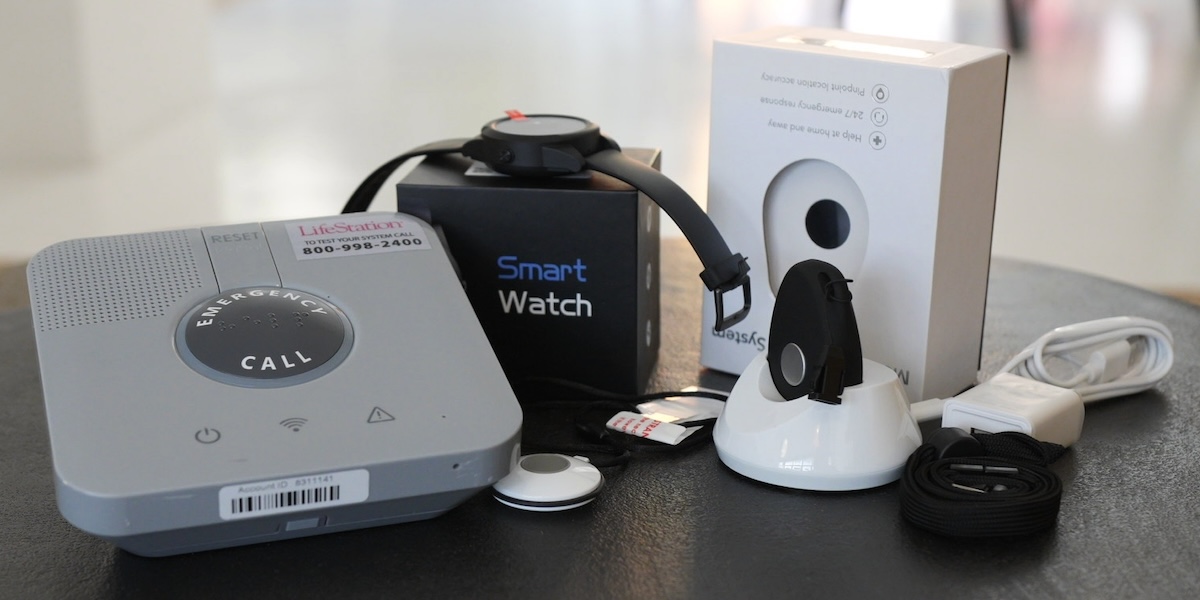
The in-home medical alert, Sidekick Home, is designed for seniors who spend most of their time at home and comes with a base station and a wearable help button. Although it’s missing optional equipment like fire, smoke, or carbon monoxide detectors, LifeStation provides round-the-clock protection.
Its base unit has a large help button with braille and connects to a portable device, also with an emergency button that can be worn as a necklace or bracelet. You can go up to 600 feet away from the base unit and still stay within range. And don’t worry if there’s a power outage – Sidekick Home comes with 32 hours of backup battery.


The two-way voice capability with a sensitive microphone is also noteworthy, as it allows you to communicate with the care specialist from virtually anywhere in your home.
LifeStation's emergency wearable buttons are completely waterproof and are built to be durable enough to withstand a fall or any other damage. The small button weighs less than half an ounce, so you’ll barely notice you have it on.
| Features | Sidekick | Sidekick Smart |
|---|---|---|
| Model | Pendant | Smartwatch |
| Fall detection | ||
| Battery life | 5 days | 1 day |
| Pedometer | ||
| Weather forecast | ||
| Heart rate monitor |
It’s highly recommended to keep embracing an active lifestyle later in life. But, of course, an unfortunate event can happen when you least expect it.
LifeStation offers two portable devices to accompany you outside of your home: Sidekick, a mobile pendant, and Sidekick Smart, a smartwatch.
Both devices feature two-way speakers, integrate with Amazon Alexa, are water-resistant, can be paired with LifeStation's free ‘Find My Loved One’ feature, and can pinpoint your exact location using GPS and Wi-Fi signaling.


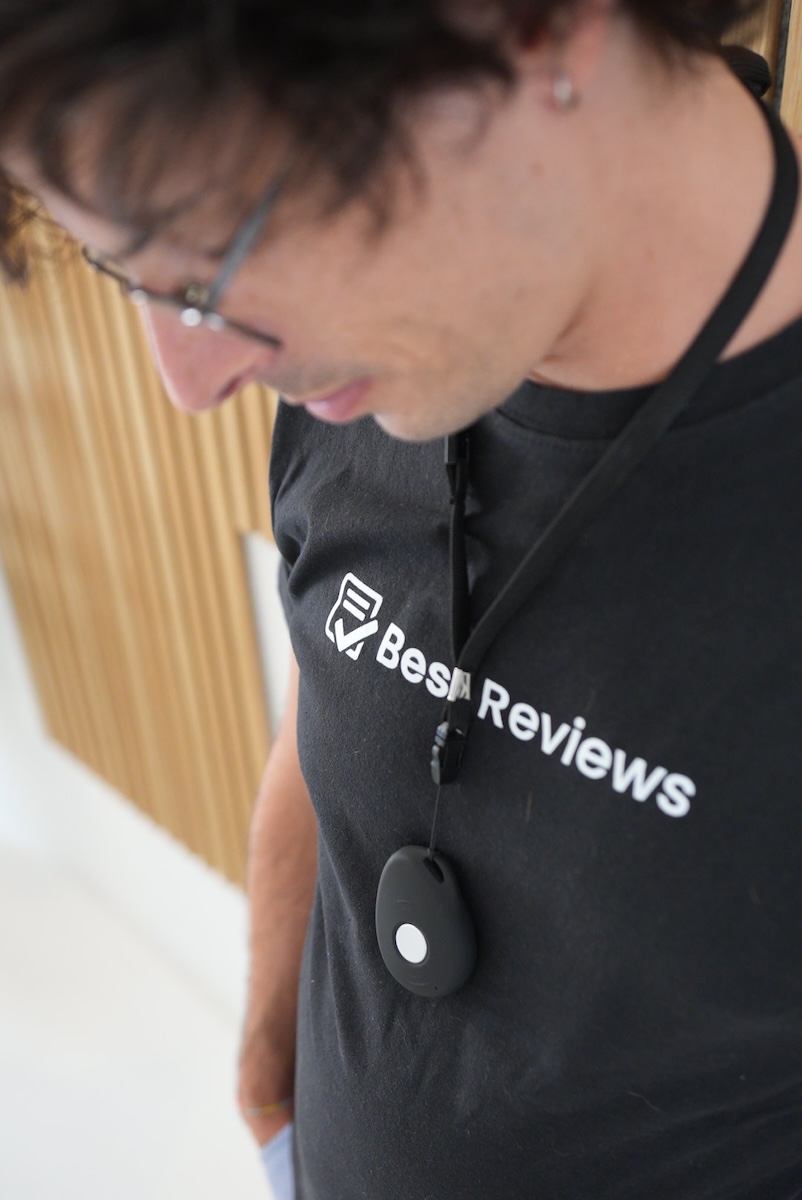
Picking up the Sidekick pendant, we felt it was extremely lightweight and fit perfectly in the palm of a hand. It comes with a strap (or you can use your own as the device is detachable), so it can easily be worn around your neck. It has side buttons with RGB lights: red to signal the battery is low, green to indicate the device is working, and blue for when location services are on standby.
Sidekick Smart is a standard smartwatch in size and weight, and we found it so comfortable that we almost couldn’t feel it on. It basically doesn’t look like a medical alert system at all. The device is a stripped-back version of a smartwatch, with only five screens to swipe through: home (which displays time, date, battery, and signal), heart rate, steps, weather, and turn off. The help button is disguised as the typical button seen on the right side of all watches.
Both devices are far sleeker and more stylish than the majority of medical alert systems on the market.
| 24/7/365 monitoring | |
|---|---|
| Medical monitoring | |
| 2-way communication | |
| Fall detection |
During an emergency, a quick and precise reaction is crucial. That’s why LifeStation puts great emphasis on its monitoring services that have received many of the industry’s top certifications, including a Five Diamond Certification from the Central Station Alarm Association (CSAA).
When an elderly person is in trouble, immediate help can be summoned by pushing the emergency help button. This will immediately contact the monitoring center, which takes around 20 seconds for a response and is available around the clock.
If the operator is unable to hear or talk to the device wearer, they will then follow a set of instructions that were predefined by the senior or family members when the device was first set up. These instructions may be to contact the relevant medical personnel followed by family members, friends, or neighbors.
One highlight is that it’s not a problem if you press the button by mistake – you can just let the operator know when they pick up. Plus, if you need to talk to someone in a different language, LifeStation can use translation services.
If you’re looking for additional protection beyond the standard service, fall detection can be added to most products at an extra cost.
LifeStation uses a proprietary sensor within the help button that automatically notifies the monitoring center when a fall occurs. Although it isn’t bulletproof, it’s still useful to have in case of a hard fall.

As an extra layer of reassurance, family members and caregivers can also take advantage of LifeStation's mobile app ‘Find My Loved One’.
It accurately pinpoints the senior’s location in real time and sends it via text message. Similarly, it’s possible to locate them remotely using Amazon’s Alexa app.
We were also impressed that users can book rides to medical appointments via the monitoring center thanks to the partnership between LifeStation and Uber Health.
If you’d like to get one of LifeStation's products, you can contact the company by phone. You’ll be connected to a senior care expert who can assist you in ordering your free equipment and choosing optional features, such as fall detection, a lock box, and additional help buttons.
LifeStation doesn’t offer installation services as its medical alert systems are designed to be plug-and-play, so that even people who are not tech-savvy can set them up in less than five minutes.
You don’t need to have a landline either, as the in-home device is wireless and uses AT&T services.

It’s all just a matter of plugging the base console into the wall and testing the device by pressing the help button.
If you’re using a LifeStation on-the-go device, all you need to do is charge it, push the help button, and you’ll be connected to an operator.
Both the Sidekick and Sidekick Smart also run on the AT&T 4G LTE network.
If you find yourself needing assistance with its setup, you can always call LifeStation's customer service, and a care specialist will guide you.
| Activation fee | $99.95 |
|---|---|
| Lifetime price guarantee | |
| Free spouse monitoring | |
| Free shipping |
LifeStation products are priced with each customer’s budget and lifestyle in mind. There are no long-term contracts, so you can easily opt out of the service at any time.
LifeStation's Sidekick Home starts at $35.95 per month, Sidekick at $39.95 per month, and Sidekick Smart at $47.90 per month. Keep in mind that extra features like fall detection and a lockbox cost an additional fee.
LifeStation allows you to pay monthly, quarterly, or annually for the service, with no reduction on the cost for longer commitments. However, if you opt for monthly billing, you’ll have to pay $12.50 for shipping, whereas it’s free for the other cycles. Plus, you get one free month if you go for annual billing.
You can also check out LifeStation's website or call +1 (855)-622-7321 to inquire about personalized offers or the availability of special promotions.
The main downside is that Sidekick and Sidekick Smart include a $99.95 activation fee, which is only revealed at checkout.
On a positive note, LifeStation agrees to replace or repair all equipment due to normal wear and tear. Plus, there’s a 30-day money-back guarantee for all its medical alert systems. If you’re not satisfied with the service, you can return the equipment at any time during the period, and LifeStation will refund you in full.
You can also purchase additional emergency buttons, and if you’re looking for that bit extra, LifeStation Luxury is an elegant blue pendant that can be paired with a mobile device to act as an alert button. Although it only has a battery lifespan of one year, it works at a distance of up to 200 feet.
| 24/7 | |
| Live chat | |
| Phone |
LifeStation received an A+ rating from the Better Business Bureau.
Its customer service is ready for any kind of question, any time, any day, and can be contacted either by phone or email.
No matter which you choose, you’ll get a quick response, and phone calls are answered by real people and not by prerecorded messages.
On its website, you can find a comprehensive guide about the service, and you can also request a free brochure.
Online customer reviews back up our experience, with people complimenting LifeStation's customer service agents for their professionalism, friendliness, and helpfulness.
Additionally, LifeStation has a strong presence on social media, including Facebook, Instagram, and X, where it shares news and updates related to the company and the medical alert industry.
LifeStation offers sleek and lightweight devices that strike the balance between modern technology and straightforward functionality.
With an easy setup process for all packages, fall detection available, and well-trained operators on hand 24/7, we weren’t surprised that LifeStation's monitoring service has received numerous certifications.

On top of all that, the solutions are affordable, and the 30-day money-back guarantee provides a safety blanket before making a commitment.
The main drawbacks are the lack of accessories like fire, smoke, or CO detectors, and the activation fee that comes with the on-the-go devices.
All in all, our take is that seniors with an active lifestyle will get the most out of this product, with two alert systems designed especially for being out and about.
LifeStation's Sidekick is a medical alert device that can be worn in or outside the house. It’s a water-resistant pendant that uses GPS, WiFi, and the AT&T 4G LTE network to ensure that the wearer can always be located.
Yes, LifeStation's Sidekick Smart is a smartwatch that can monitor the wearer’s heart rate, track steps, display the weather forecast, and put you through to a 24/7 monitoring center at the push of a button.
LifeStation's Sidekick Home starts at $35.95 per month, Sidekick at $39.95 per month, and Sidekick Smart at $47.90 per month.
LifeStation's customer service is highly reliable. It received an A+ rating from the Better Business Bureau and is well-renowned online for its professionalism, fast response times, and helpfulness.
We’ve reviewed over 25 medical alert systems and spent thousands of hours researching medical alerts, senior health, and senior security.
All our reviews are unbiased and transparent – our partners choose us to get honest feedback from experts that our readers can trust.
Whenever possible, we get hands-on testing of the devices. When we can’t, we analyze hundreds of verified user reviews to ensure our recommendations are accurate and truly helpful.






Share your thoughts, ask questions, and connect with other users. Your feedback helps our community make better decisions.
©2012-2025 Best Reviews, a clovio brand –
All rights
reserved